TEFAL OPTIGRILL ELITE GC750

OPTIGRILL ELITE GC750 Perfect grilling results from rare to well-done

Master meat grilling with OptiGrill Elite for perfect results everytime, whatever your meat cooking preferences, from rare to well-done.
Its intelligent technology measures the thickness of the meat and takes in consideration the number of pieces to adjust automatically the cooking time for perfect grilling results.
Get restaurant-like results with amazing stripes on your meat with the new searing boost function.
Grilling is easy with the intuitive grilling assistant at your fingertips, guiding you step-by-step and counting down to the second when done.
Twelve automatic programs also ensure delicious chicken, fish, vegetables and more, without the need to monitor.

Moreover, removable non-stick grilling plates and juice collector tray are dishwasher-safe.

Grilling has never been easier!

Reference: GC750D60

OptiGrill Elite, Intelligent Grill: Perfect Grilling results

Grill like a pro and delight your loved ones whatever their meat cooking preferences, from rare to well-done. Thanks to the patented OptiGrill intelligent technology which measures the quantity and thickness of your meat, ideal cooking times are automatically set for perfect grilling results. The intuitive grilling assistant guides you, step by step, so you know when to add and remove your meat, whether you like it rare, medium or well done. The new searing boost function sears meat to perfection with stripes, just like with a restaurant grill.

Enjoy endless possibilities beyond meat with 12 automatic programs for delicious chicken, fish, vegetables and more, with no need for monitoring. Removable non-stick grilling plates and juice collector tray are dishwasher-safe for a hassle-free grilling experience like no other.  OptiGrill Elite comes with a recipe booklet for endless cooking possibilities!

  • Grill like a pro :  OptiGrill Elite's intelligent technology measures the quantity and thickness of your meat,and sets ideal cooking times automatically for perfect grillling results.
  • The most seamless electric grill experience : The intuitive grilling assistant guides you step-by-step, counting down to the second, so you know when to add and remove your meat, whether for rare, medium or well done
  • Restaurant quality searing : the searing boost function ensures perfect searing everytime
  • Easy-to-use indoor grill: 12 automatic programs for meats, chicken, fish, vegetables and more for perfect results - no need to monitor
  • Hassle-free clean-up: removable parts are dishwasher-safe
  • Endless possibilities: year-round grilling from the comfort of your kitchen, plus endless ideas with the recipe book
Essentials
  • Enjoy perfect grilling results

    The intelligent technology measures the thickness of the meat and takes in consideration the number of pieces to adjust automatically the cooking time ( from rare to well-done) for perfect grilling results.

  • The most seamless grilling experience

    The new interface with its intuitive grilling assistant and countdown timer guides you step by step, so you know your meat is ready, whether you like it rare, medium or well-done.

  • Restaurant-quality searing

    With the searing boost function, enjoy delicious and perfectly seared meat, with amazing stripes.

  • Enjoy endless possibilities, everyday

    12 automatic programs for meat, chicken, fish, vegetables and more; no need to monitor for perfect grilling results.

  • Be inspired everyday

    26 recipe-book included 

  • Say goodbye to the chore of cleaning

    Removable non-stick plates and juice collector tray are dishwasher-safe

Features
Up to 4 people  
Screen with intuitive grilling assistant and a countdown  
   
Plates + juice tray  
Power 1830-2180  W
   
Automatic cooking system    
Intuitive grilling guide  
Manual mode    
   
   
Capacitive  
Removable plates    
Removable juice tray    
Dishwasher safe    
Body Stainless steel  
Handle Thermoplastic  
On/Off Switch    
Pilot light    
Adjustable thermostat    
Ready to cook light    
Recipes included    
Type of plug EUR  
Voltage 220-240  V
Frequency 50-60  Hz
Frequent questions
• Choose the "Search" tab in the navigation bar.
• Enter a word in the search field.

Tip: recipes are found using key words, so it is easier to enter a type of vegetable (e.g. carrot) rather than just vegetable.
You must create an account and log in to your app to access this feature.

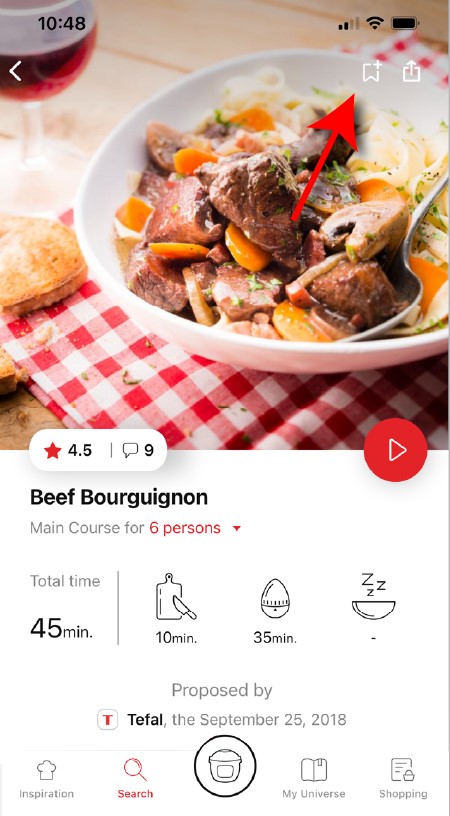
• Go to the recipe you wish to bookmark and select the bookmark logo in the top right corner.
highlighting the bookmark function in the Companion app
• A "My Notebooks" tab appears: select the "My Favorites" location.
• The recipe has been added.
You need to create an account and sign in to the application in order to access this feature.
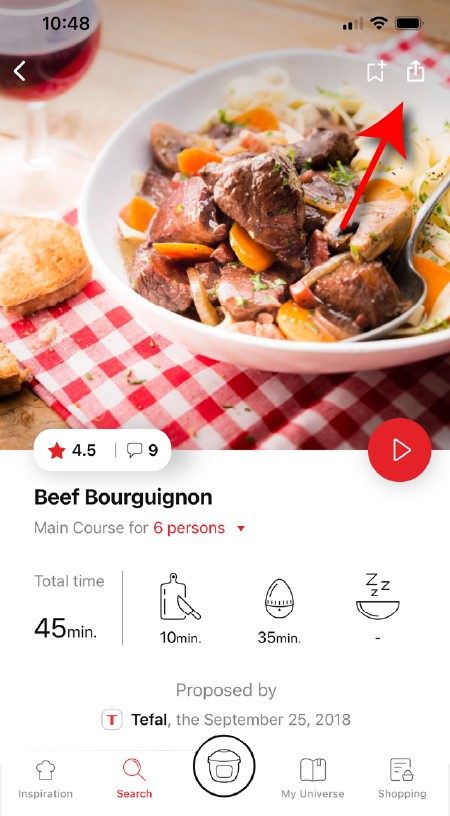
Click the sharing logo to view the sharing options.
highlighting the sharing functionality in the Companion app
You can then choose how you would like to share this recipe.
The application has rich content and requires a stable Wi-Fi connection to download correctly.
If your application does not download correctly, delete it and try to download again when you have a more stable Wi-Fi connection.
During initial installation, the download may take several minutes while the application saves all the photos on your Smartphone or tablet.
Your application uses notifications to alert you at the end of cooking times using a beep.
If you want to turn off this signal, simply deactivate it in your tablet or Smartphone.
You may also disable sounds in the parameter settings for notifications on your telephone or tablet.
Your application uses notifications to alert you when your cooking is finished but also to let you know when new content (information, recipe...) is available.
If you wish, you can disable them from your smartphone settings.
You can choose not to accept cookies.
However, the grey cookies banner will remain on your screen as long as you do not click on "accept".
Cookies are used for audience measurement and personalization to help us improve your use of the product.

Audience measurement solutions allow us to analyze traffic, trends, usage and identify malfunctions in order to improve your experience.

Personalization solutions allow us to improve the quality of the information and services we provide and make your experience more enjoyable.

You can accept or deny the use of cookies when you first launch your device.
You must create an account and log in to your app to access these features.

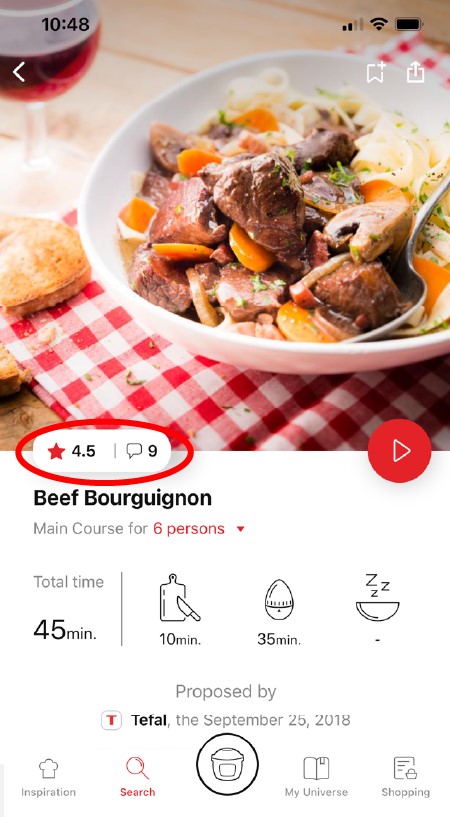
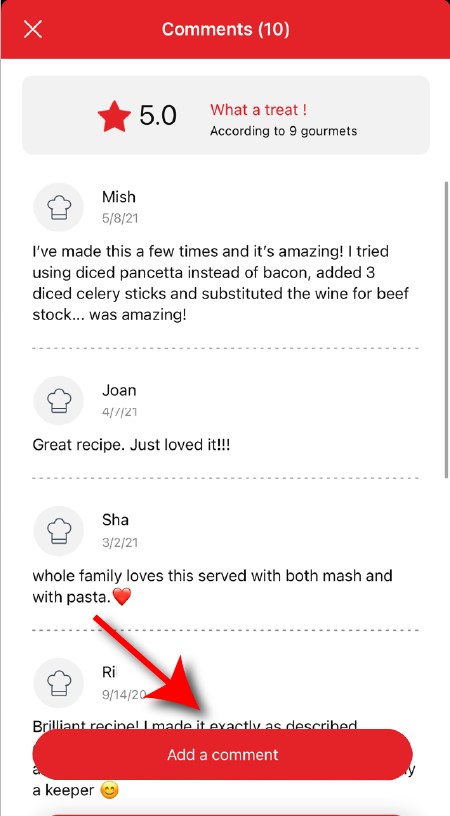
Once logged into your account, you will be able to rate the recipe and add a comment by following the instructions that appear on the screen after clicking on the notes/comments space.
highlighting rating feature from comments page in the Companion apprating page in the Companion app
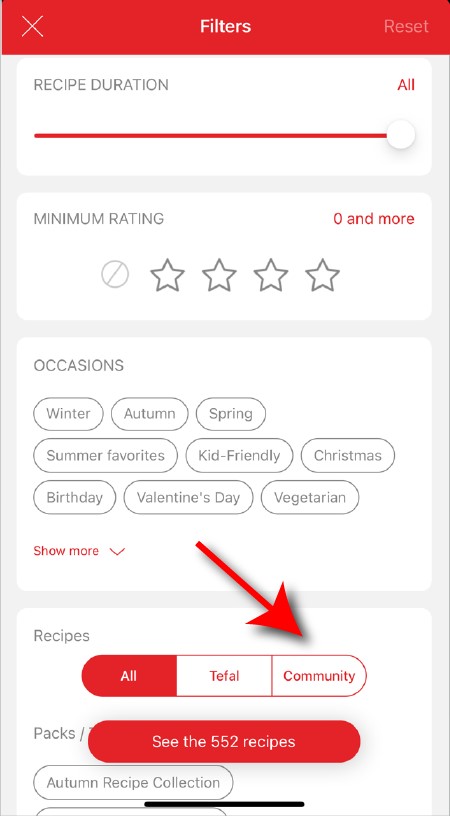
When using the search function, select "Filter recipes".
In the "Recipes" section, select "Community" only.
You will then be able to see the recipes from the community.
recipe filters page in the Companion app
Once you have completed your search, specific filters make it easier for you to find the recipes that meet your needs.

The customizable filter:
• Click on "Filter" in order to sort the recipes according to the type of dish (starter, main course, dessert), the time it takes to make the recipe, the minimum rating, their themes (or packs)...
• You can also choose to select only the recipes of the brand or the recipes proposed by the community.

Sorting recipes:
Once you have made a search, you can sort your recipes by popularity, rating, age or alphabetical order.
You must create an account and log in to your app to access these features.

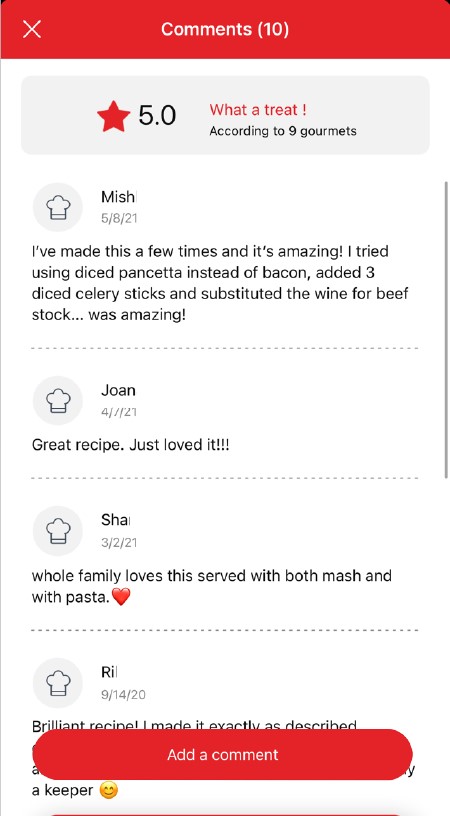
Once logged in, you will be able to read the comments and see the notes that community members have given to the recipe by clicking on the notes/comments area.
highlighting rating & comments feature from recipe page in the Companion appcomments page in the Companion app
You must create an account and log in to your app to access this feature.

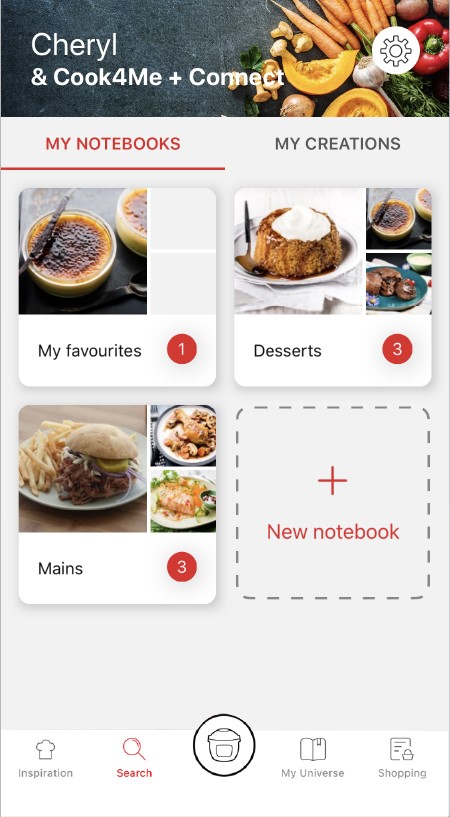
• Choose the "My Universe" tab in the navigation bar.
• There, you will find your recipe booklets and can create new ones by clicking on "New booklet".
recipes booklets page in the Companion app
Choose the "My Universe" tab in the navigation bar, then select the booklet you wish to modify or delete. Click on the pencil at the top right of the screen, then select the action you are looking for ("Delete booklet", "Rename booklet" or "Delete recipes").
It is important to select your product in the app in order to find the right recipes for that product. This way, the app will suggest hundreds of ideal recipes.
It will also let you add your accessories and access the associated recipes.
• In "My universe", select "My profile".
• Click on the image of the registered product.
• Click on "Remove the product". The app will then ask you to select a product.
Before cleaning your grill, wait around 45 minutes while the device cools. To remove heavy food residue on the grill plates or on the side, we recommend you use a wooden or plastic spatula. To clean the grill and grill components, use a cloth soaked in hot water. Do not immerse the grill in water. Do not use abbrasive cleaning products or products containing alcohol or fuel since these may damage the device.
Do not use your appliance. To avoid any danger, have it replaced by an approved repair centre.
This may be due to improper cleaning of the cooking plates.
We recommend that you pre-wash your cooking plates in the following manner before putting them in the dishwasher to remove any food residue:
- Soak the plates in hot water and degreasing dish soap for about 30 minutes,
- Scrub both sides of the plate with a sponge or a dish brush, hot water and degreasing dish soap,
- Rinse,
- Put in the dishwasher.
Press the on/off button twice in a row.
or
Press the on/off button once and confirm with OK.

• Step 1: Ensure the Optigrill is plugged into the wall socket and switched on from the mains.

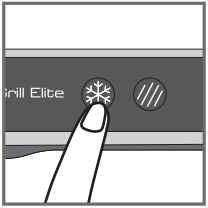
• Step 2: Press the Power button once AND IMMEDIATELY press the Frozen Food button.
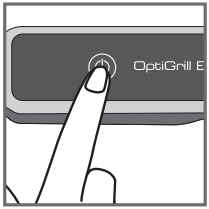

NB: the language can only be changed whilst the display states "Hello". The "Hello" status will only be active for approximately 2 seconds once the machine is switched on.
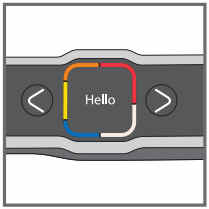

• Step 3: Toggle through the languages by pressing the cursor arrows and once you have selected the correct language, press the OK button.

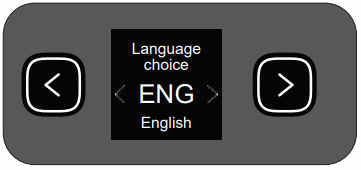
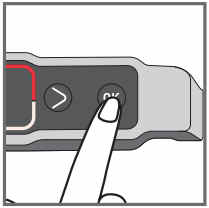
NB: If you have not followed Step 2 in the allotted time, switch off the machine via the Power button and repeat Step 2 ensuring it is done within the 2 seconds.

The device has been stored or used in a room that is too cold.
Unplug the device and wait a few minutes.
Plug the device in again and press on/off.

If the problem persists, contact Customer Service.
The device has been stored or used in a room that is too cold.
Unplug the device and wait a few minutes.
Plug the device in again and press on/off.

If the problem persists, contact Customer Service.
The device has been stored or used in a room that is too cold.
Unplug the device and wait a few minutes.
Plug the device in again and press on/off.

If the problem persists, contact Customer Service.
The device has been stored or used in a room that is too cold.
Unplug the device and wait a few minutes.
Plug the device in again and press on/off.

If the problem persists, contact Customer Service.
The device has been stored or used in a room that is too cold.
Unplug the device and wait a few minutes.
Plug the device in again and press on/off.

If the problem persists, contact Customer Service.
The device has been stored or used in a room that is too cold.
Unplug the device and wait a few minutes.
Plug the device in again and press on/off.

If the problem persists, contact Customer Service.
The device has been stored or used in a room that is too cold.
Unplug the device and wait a few minutes.
Plug the device in again and press on/off.

If the problem persists, contact Customer Service.
The device has been stored or used in a room that is too cold.
Unplug the device and wait a few minutes.
Plug the device in again and press on/off.

If the problem persists, contact Customer Service.
Unplug the device and contact Customer Service.
Two possibilities:
Press OK if all food has been removed.
or
Do not press OK and leave food to cook a little longer.
The device has remained open for too long during cooking or the device has been idle for too long after the preheating or warming has been completed.
Unplug the device and wait a few minutes. Then plug your device in again and turn it on.
The screen is still on the temperature setting.
Press OK once to go to the time setting and then adjust with the arrows. Press OK to confirm.
Two possibilities:
Press OK to continue cooking in manual mode.
or
Remove food and cut thinner to reduce the thickness, in order to allow cooking in automatic mode.
Take your device to a recycling center or waste disposal facility.
Please go to the “Accessories” section of the website to easily find whatever you need for your product.
Find more detailed information in the Guarantee section of this website.
If you believe a part is missing, please contact our customer service center and we will help you find an appropriate solution.